背景 项目 ZImgTools 是基于 Tauri 2 + Vue 3 + Vite 的图片压缩与格式转换桌面工具,源码放在 Gitee 私有仓库 。
安装包需要发布到 GitHub Release ,供用户下载。
约束与目标:
GitHub 侧不存放源码 ,只放安装包(独立仓库 psvmc/z-img-tools-releases)
需要 Windows + Linux + macOS 三平台产物
本机是 Windows,没有 macOS;Linux 也不想依赖本机 WSL / Docker
Tip
Gitee Go 收费。
Github Actions 公开仓库免费。
本地构建 Linux 环境需要用 WSL 或 Docker 并安装编译环境,Mac 环境无法在 Windows 下创建。
方案演进
阶段
做法
结果
1
Gitee Go CI 构建 + GitHub API 上传
Gitee Go 收费,放弃
2
本机 Win 构建 + WSL 构建 Linux + GHA 构建 macOS
环境维护成本高
3(最终) 三平台全部 GitHub Actions 本机只负责触发
最终方案:源码在 Gitee,构建在 GitHub Actions,发布到 GitHub Releases 空壳仓 。
架构
要点:
源码仓 (Gitee):正常开发、git tag、git push发布仓 (GitHub psvmc/z-img-tools-releases):只有 README + workflow,建议 Public (Actions 免费)workflow 不在 Gitee 跑 ,而是通过脚本同步到发布仓后触发Actions 用 GITEE_TOKEN 从 Gitee 克隆私有仓库对应 tag
一次性配置 准备 GitHub Releases 仓库 在 GitHub 创建 psvmc/z-img-tools-releases,main 分支至少有一个 commit(例如 README)。
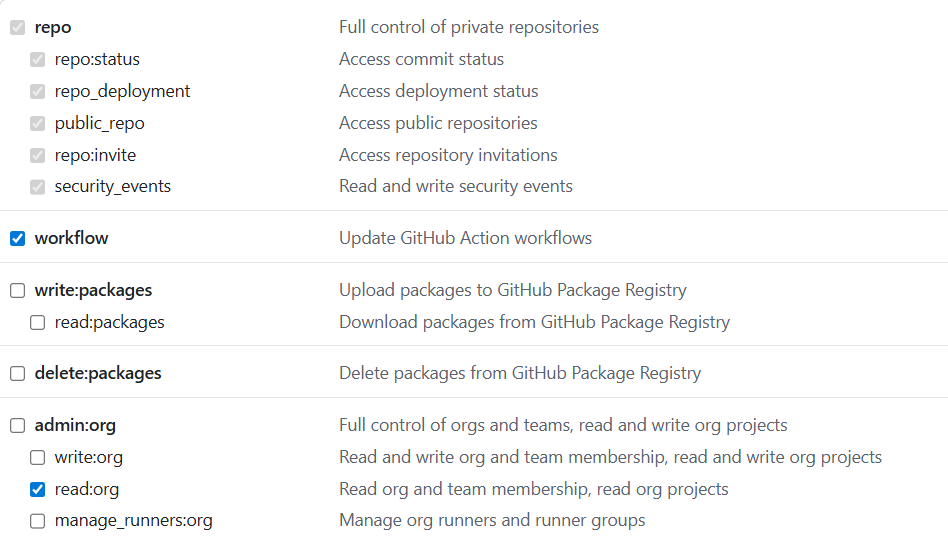
GitHub Token Token 创建入口(登录 GitHub 后打开):
Classic:https://github.com/settings/tokens/new
勾选下面的权限:
安装 GitHub CLI 1 winget install GitHub.cli
如果安装不成功,执行下面的命令
1
2
3
winget source reset --force winget source update winget install GitHub.cli --accept-source-agreements --accept-package-agreements
安装完要重启终端
配置 Gitee 私人令牌 在 Gitee 私人令牌 创建令牌,勾选 projects 读权限。
私人令牌 - Gitee.com
写入发布仓 Secret(须带 --body,不要用不带 --body 的交互命令,否则 Windows 下容易写入空值):
1 gh secret set GITEE_TOKEN -R psvmc/z-img-tools-releases --body "你的Gitee令牌"
验证:触发 workflow 后,日志中 GITEE_TOKEN: 应显示 ***,而不是空白。
注意每个发布仓都要单独配置一次 Secret。
项目内脚本 源码仓库 scripts/ 目录下保留以下文件:
1
2
3
4
5
6
scripts/ ├── publish-release.bat # 发版入口 └── release/ ├── ensure-release-gha.bat # 同步 workflow 到发布仓 ├── ensure-release-gha.ps1 # 通过 GitHub Contents API 上传 workflow └── github-workflow-release-all.yml # 三平台构建 workflow 模板
publish-release.bat 会 call scripts\release\ensure-release-gha.bat,上述 release/ 目录必须完整,否则报「系统找不到指定的路径」。
发版流程 流程 1 2 3 git tag 1 .0 .0 git push origin 1 .0 .0 scripts\publish-release.bat
或指定版本:
1 scripts\publish-release.bat 1 .0 .0
注意 :Gitee tag 与 src-tauri/Cargo.toml、src-tauri/tauri.conf.json、package.json 中的版本号保持一致,不加 v 前缀 (如 1.0.0,不是 v1.0.0)。
发版前务必先 git push origin <tag>,否则 Actions 克隆不到对应 tag。
脚本会:
从 src-tauri/Cargo.toml 读取版本号(未传参时)
将 github-workflow-release-all.yml 同步到 psvmc/z-img-tools-releases 的 .github/workflows/release-all.yml
触发 release-all.yml workflow
约 10~30 分钟后在 Release 页查看:
产物
文件
平台
ZImgTools_*_x64-setup.exe(NSIS 安装包)Windows
z-img-tools_*_amd64.debLinux
ZImgTools_*_universal.dmgmacOS(Universal 二进制)
Actions 中只打 NSIS / deb / dmg 三种格式。本地如需更多格式(如 AppImage、msi),可执行 npm run tauri build -- --bundles appimage,msi。
项目开发时 tauri.conf.json 中 bundle.active 为 false,workflow 构建前会临时改为 true 以生成安装包。
脚本代码 发版入口 路径:scripts/publish-release.bat
读版本号、同步 workflow、触发 GitHub Actions。
1 2 3 4 5 6 7 8 9 10 11 12 13 14 15 16 17 18 19 20 21 22 23 24 25 26 27 28 29 30 31 32 33 34 35 36 37 38 39 40 41 42 43 44 45 46 47 48 49 50 51 52 53 54 55 56 57 58 59 60 @echo off setlocal EnableDelayedExpansioncd /d "%~dp0.."set "GITHUB_REPO=psvmc/z-img-tools-releases"set "GITEE_REPO=https://gitee.com/psvmc/z-img-tools-tauri.git"set "TAG=":parse_args if "%~1 "=="" goto args_doneif not defined TAG set "TAG=%~1 "shift goto parse_args:args_done if not defined TAG ( for /f "usebackq tokens=2 delims== " %%a in (`findstr /R /C:"^version " src-tauri\Cargo.toml`) do set "VER =%%a " set "VER =!VER:"=! " for /f "tokens=* delims= " %%a in ("!VER! ") do set "VER =%%a " set "TAG=!VER! " ) where gh >nul 2 >&1 || ( echo [error] Install GitHub CLI and run: gh auth login exit /b 1 ) echo .echo === ZImgTools release (GitHub Actions: Windows + Linux + macOS) ===echo Tag: %TAG% echo GitHub repo: %GITHUB_REPO% echo Gitee repo: %GITEE_REPO% echo .echo Prerequisites:echo 1 . Gitee token in GitHub secret GITEE_TOKENecho gh secret set GITEE_TOKEN -R %GITHUB_REPO% --body "YOUR_GITEE_TOKEN"echo 2 . Push tag to Gitee: git push origin %TAG% echo .set "GITHUB_REPO=%GITHUB_REPO% "call "%~dp0release\ensure-release-gha.bat"if errorlevel 1 exit /b 1 echo Triggering release-all workflow...gh workflow run release-all.yml -R "%GITHUB_REPO% " -f "tag=%TAG% " -f "gitee_repo=%GITEE_REPO% " if errorlevel 1 ( echo [error] Failed to start workflow exit /b 1 ) echo .echo Build started. Wait 10 -30 min, then check:echo https://github.com/%GITHUB_REPO% /releases/tag/%TAG% echo https://github.com/%GITHUB_REPO% /actionsecho .echo Watch: gh run watch -R %GITHUB_REPO% exit /b 0
同步 workflow 路径:scripts/release/ensure-release-gha.bat
调用 PowerShell,将 workflow 上传到发布仓。
1 2 3 4 5 6 7 8 9 10 11 12 13 @echo off setlocal cd /d "%~dp0..\.."if not defined GITHUB_REPO set "GITHUB_REPO=psvmc/z-img-tools-releases"where gh >nul 2 >&1 || ( echo [error] gh not found. Run: gh auth login exit /b 1 ) powershell -NoProfile -ExecutionPolicy Bypass -File "%~dp0ensure-release-gha.ps1" -Repo "%GITHUB_REPO% " exit /b %errorlevel%
上传 workflow 路径:scripts/release/ensure-release-gha.ps1
通过 GitHub Contents API 创建或更新 .github/workflows/release-all.yml。
1 2 3 4 5 6 7 8 9 10 11 12 13 14 15 16 17 18 19 20 21 22 23 24 25 26 27 28 29 30 31 32 33 34 35 36 37 38 39 40 41 42 43 44 45 46 47 48 param ( [string ]$Repo = $env:GITHUB_REPO ) $ErrorActionPreference = 'Stop' if (-not $Repo ) { $Repo = 'psvmc/z-img-tools-releases' }$workflowName = 'release-all.yml' $workflowPath = ".github/workflows/$workflowName " $sourceFile = Join-Path $PSScriptRoot 'github-workflow-release-all.yml' if (-not (Test-Path $sourceFile )) { Write-Error "Missing $sourceFile " } $content = [IO.File ]::ReadAllText($sourceFile )$b64 = [Convert ]::ToBase64String([Text.Encoding ]::UTF8.GetBytes($content ))$apiArgs = @ ( "repos/$Repo /contents/$workflowPath " , '-X' , 'PUT' , '-f' , "message=Add or update release-all workflow" , '-f' , "content=$b64 " , '-f' , 'branch=main' ) $prevEap = $ErrorActionPreference $ErrorActionPreference = 'SilentlyContinue' $existingJson = gh api "repos/$Repo /contents/$workflowPath " 2 >$null $checkCode = $LASTEXITCODE $ErrorActionPreference = $prevEap if ($checkCode -eq 0 -and $existingJson ) { $existing = $existingJson | ConvertFrom-Json if ($existing .sha) { $apiArgs += '-f' , "sha=$ ($existing .sha)" Write-Host "Updating workflow on $Repo ..." } } else { Write-Host "Creating workflow on $Repo ..." } gh api @apiArgs if ($LASTEXITCODE -ne 0 ) { exit $LASTEXITCODE }Write-Host "Workflow ready: https://github.com/$Repo /blob/main/$workflowPath "
三平台构建 workflow 路径:scripts/release/github-workflow-release-all.yml(同步到发布仓后为 .github/workflows/release-all.yml)
matrix 并行构建 Win / Linux / macOS,汇总 artifact 后发布 Release。构建使用 Rust + npm + Tauri CLI ,与 Wails 方案不同。
1 2 3 4 5 6 7 8 9 10 11 12 13 14 15 16 17 18 19 20 21 22 23 24 25 26 27 28 29 30 31 32 33 34 35 36 37 38 39 40 41 42 43 44 45 46 47 48 49 50 51 52 53 54 55 56 57 58 59 60 61 62 63 64 65 66 67 68 69 70 71 72 73 74 75 76 77 78 79 80 81 82 83 84 85 86 87 88 89 90 91 92 93 94 95 96 97 98 99 100 101 102 103 104 105 106 107 108 109 110 111 112 113 114 115 116 117 118 119 120 121 122 123 124 125 126 127 128 129 130 131 132 133 134 135 136 137 138 139 140 141 142 143 144 145 146 147 148 149 150 151 152 153 154 155 156 157 158 159 160 161 162 name: Release All Platforms on: workflow_dispatch: inputs: tag: description: Release tag (e.g. 1.0 .0 ) required: true gitee_repo: description: Gitee source URL (no credentials) required: false default: https://gitee.com/psvmc/z-img-tools-tauri.git permissions: contents: write jobs: build: strategy: fail-fast: false matrix: include: - os: windows-latest platform: windows - os: ubuntu-22.04 platform: linux - os: macos-latest platform: macos runs-on: ${{ matrix.os }} steps: - name: Clone from Gitee env: GITEE_TOKEN: ${{ secrets.GITEE_TOKEN }} GITEE_REPO: ${{ inputs.gitee_repo }} RELEASE_TAG: ${{ inputs.tag }} shell: bash run: | set -euo pipefail if [ -z "${GITEE_TOKEN:-}" ]; then echo "::error::Set secret GITEE_TOKEN on this repository (Gitee private token, scope: projects)" exit 1 fi REPO_PATH="${GITEE_REPO#https://}" AUTH_URL="https://oauth2:${GITEE_TOKEN}@${REPO_PATH}" git config --global http.postBuffer 524288000 git config --global http.version HTTP/1.1 TAG_CANDIDATES=("$RELEASE_TAG") if [[ "$RELEASE_TAG" == v* ]]; then TAG_CANDIDATES+=("${RELEASE_TAG#v}") else TAG_CANDIDATES+=("v${RELEASE_TAG}") fi clone_ok=false for TAG in "${TAG_CANDIDATES[@]}" ; do for attempt in 1 2 3 ; do echo "Cloning tag ${TAG} (attempt ${attempt})..." rm -rf repo if git clone --depth 1 --branch "$TAG" "$AUTH_URL" repo; then echo "Cloned tag ${TAG}" clone_ok=true break 2 fi sleep $((attempt * 5 )) done done if [ "$clone_ok" != true ]; then echo "::error::Failed to clone tag ${RELEASE_TAG} from Gitee. Push the tag first: git tag ${RELEASE_TAG#v} && git push origin ${RELEASE_TAG#v}" exit 1 fi - name: Install NSIS (Windows) if: matrix.platform == 'windows' shell: pwsh run: choco install nsis -y --no-progress - name: Install Linux deps if: matrix.platform == 'linux' run: | sudo apt-get update sudo apt-get install -y libwebkit2gtk-4.1-dev libappindicator3-dev librsvg2-dev patchelf - uses: actions/setup-node@v4 with: node-version: "20" cache: npm cache-dependency-path: repo/package-lock.json - uses: dtolnay/rust-toolchain@stable with: targets: ${{ matrix.platform == 'macos' && 'aarch64-apple-darwin,x86_64-apple-darwin' || '' }} - uses: swatinem/rust-cache@v2 with: workspaces: repo/src-tauri -> target - name: Build working-directory: repo shell: bash run: | set -euo pipefail npm ci node -e " const fs = require('fs'); const path = 'src-tauri/tauri.conf.json'; const cfg = JSON.parse(fs.readFileSync(path, 'utf8')); cfg.bundle.active = true; fs.writeFileSync(path, JSON.stringify(cfg, null, 2) + '\n'); " mkdir -p release if [ "${{ matrix.platform }} " = "windows" ]; then npm run tauri build -- --bundles nsis find src-tauri/target -path '*/release/bundle/nsis/*.exe' -exec cp -f {} release/ \; elif [ "${{ matrix.platform }} " = "linux" ]; then npm run tauri build -- --bundles deb find src-tauri/target -path '*/release/bundle/deb/*.deb' -exec cp -f {} release/ \; else npm run tauri build -- --target universal-apple-darwin --bundles dmg find src-tauri/target -path '*/release/bundle/dmg/*.dmg' -exec cp -f {} release/ \; fi if [ -z "$(ls -A release 2>/dev/null)" ]; then echo "::error::No release artifacts found" find src-tauri/target -path '*/release/bundle/*' -type f | head -50 exit 1 fi ls -la release/ - name: Upload artifact uses: actions/upload-artifact@v4 with: name: ${{ matrix.platform }} path: repo/release/* publish: needs: build runs-on: ubuntu-latest steps: - name: Download artifacts uses: actions/download-artifact@v4 with: path: dist merge-multiple: true - name: List release files run: find dist -type f -ls - name: Publish to GitHub Release uses: softprops/action-gh-release@v2 with: tag_name: ${{ inputs.tag }} target_commitish: main name: ZImgTools ${{ inputs.tag }} generate_release_notes: true files: dist/** env: GITHUB_TOKEN: ${{ secrets.GITHUB_TOKEN }}
小结 这套方案的核心思路:
源码与发布分离 — Gitee 管代码,GitHub 管安装包构建全部上云 — 三平台 matrix,本机零构建环境依赖workflow 随源码版本管理 — 发版时 ensure-release-gha 同步到发布仓,改 workflow 不用去 GitHub 网页手改
本地开发构建仍可用 npm run tauri build,与发版流程无关。
发版检查清单
src-tauri/Cargo.toml、src-tauri/tauri.conf.json、package.json 版本号已改为新版本代码已 push 到 Gitee,git tag 且 git push origin <tag>
发布仓 Secret GITEE_TOKEN 有效(日志中为 ***)
执行 scripts\publish-release.bat,用 gh run watch -R psvmc/z-img-tools-releases 查看进度
踩坑记录
问题
处理
Gitee 私有仓 Actions 无法 clone
配置 GITEE_TOKEN,用 oauth2:TOKEN@ 克隆
报错 Set secret GITEE_TOKEN 但已设置过
Windows 下 gh secret set 未带 --body 写入了空 Secret ;用 gh secret set GITEE_TOKEN -R psvmc/z-img-tools-releases --body "令牌" 重写;日志中 GITEE_TOKEN: 应为 *** 而非空白
tag 加了 v 前缀找不到
Gitee 用 1.0.0 而非 v1.0.0;publish-release.bat 不再自动加 v
报错 Failed to clone tag
先 git push origin <tag> 把 tag 推到 Gitee,再触发 workflow
bundle.active 为 false 无安装包workflow 构建前用 node 脚本临时改为 true,并指定 --bundles nsis/deb/dmg
macOS 只打单架构
使用 --target universal-apple-darwin 并预装 aarch64-apple-darwin,x86_64-apple-darwin targets