获取系统版本 每一种方式都能获取系统版本,但是对于Win11,有的方式获取出来的依旧是Win10。
通过Version获取 获取版本名称 注意:
通过版本号不能判断Win11,但是这里可以通过构建号来判断是否为Win11。
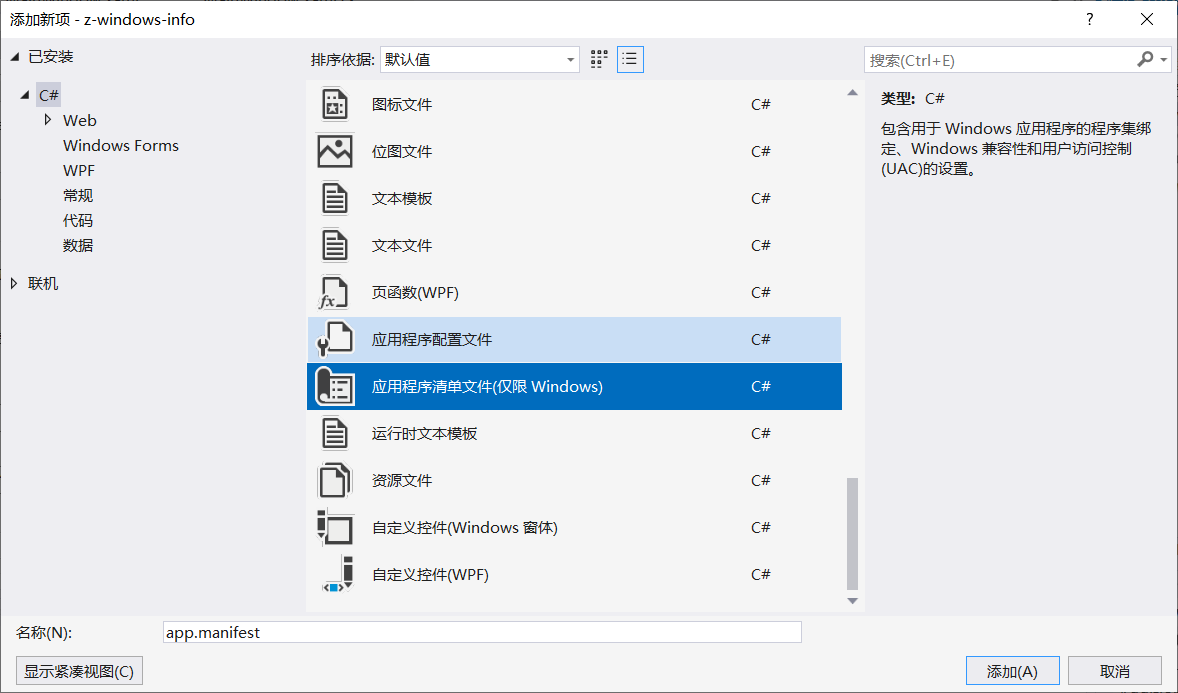
需要添加应用程序清单文件(仅限Windows)。
代码
1 2 3 4 5 6 7 8 9 10 11 12 13 14 15 16 17 18 19 20 21 22 23 24 25 26 27 28 29 30 31 32 33 34 35 36 37 38 39 40 41 42 43 44 45 46 47 48 49 50 51 52 53 54 55 56 57 58 59 60 61 62 63 64 65 66 67 public static string GetOsVersion ( OperatingSystem os = Environment.OSVersion; Version vs = os.Version; string operatingSystem = "" ; switch (os.Platform) { case PlatformID.Win32Windows: switch (vs.Minor) { case 0 : operatingSystem = "95" ; break ; case 10 : operatingSystem = vs.Revision.ToString() == "2222A" ? "98SE" : "98" ; break ; case 90 : operatingSystem = "Me" ; break ; } break ; case PlatformID.Win32NT: switch (vs.Major) { case 3 : operatingSystem = "NT 3.51" ; break ; case 4 : operatingSystem = "NT 4.0" ; break ; case 5 : operatingSystem = vs.Minor == 0 ? "2000" : "XP" ; break ; case 6 : if (vs.Minor == 0 ) operatingSystem = "Vista" ; else if (vs.Minor == 1 ) operatingSystem = "7" ; else if (vs.Minor == 2 ) operatingSystem = "8" ; else operatingSystem = "8.1" ; break ; case 10 : operatingSystem = "10" ; if (os.Version.Build >= 22000 ) { operatingSystem = "11" ; } break ; } break ; } if (operatingSystem != "" ) { operatingSystem = "Windows " + operatingSystem; if (os.ServicePack != "" ) { operatingSystem += " " + os.ServicePack; } } return operatingSystem; }
比较版本 需要添加应用程序清单文件(仅限Windows)。
判断是否是Win10及以上:
1
2
3
4
5
6
7
8
9
10
11
12
13
14
15
16
17
18
19
20
21
using System;class Program { static void Main ( Version win10Version = new Version(10 , 0 ); Version osVersion = Environment.OSVersion.Version; bool isWindows10OrAbove = osVersion >= win10Version; if (isWindows10OrAbove) { Console.WriteLine("系统是 Windows 10 或更高版本。" ); } else { Console.WriteLine("系统不是 Windows 10 或更高版本。" ); } } }
Win10获取的是Win8 此方法在Win10下获取的值可能不是10,这是因为版本不兼容,解决方案是程序应用清单中增加配置:
添加 => 新建项 => 应用程序清单文件(仅限Windows)
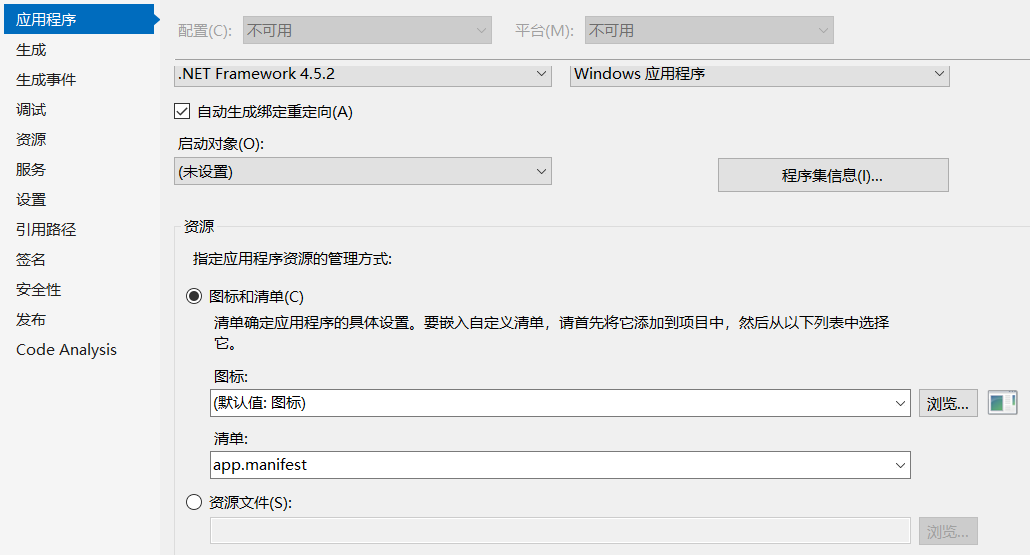
添加后属性中已经默认选择了这个清单文件
把清单中的这些配置解除注释
1 2 3 4 5 6 7 8 9 10 11 12 13 14 15 16 17 18 19 20 21 22 23 <compatibility xmlns ="urn:schemas-microsoft-com:compatibility.v1" > <application > <supportedOS Id ="{e2011457-1546-43c5-a5fe-008deee3d3f0}" /> <supportedOS Id ="{35138b9a-5d96-4fbd-8e2d-a2440225f93a}" /> <supportedOS Id ="{4a2f28e3-53b9-4441-ba9c-d69d4a4a6e38}" /> <supportedOS Id ="{1f676c76-80e1-4239-95bb-83d0f6d0da78}" /> <supportedOS Id ="{8e0f7a12-bfb3-4fe8-b9a5-48fd50a15a9a}" /> </application > </compatibility >
这时候就能正常获取Win10了。
版本号
Version
PlatformID
Major version
Minor version
Windows 95
Win32Windows
4
0
Windows 98
Win32Windows
4
10
Windows Me
Win32Windows
4
90
Windows NT 4.0
Win32NT
4
0
Windows 2000
Win32NT
5
0
Windows XP
Win32NT
5
1
Windows XP 64-Bit Edition
Win32NT
5
1
Windows 2003
Win32NT
5
2
Windows Server 2003
Win32NT
5
2
Windows Server 2003 R2
Win32NT
5
2
Windows 2003
Win32NT
5
2
Windows Vista
Win32NT
6
0
Windows 2008
Win32NT
6
0
Windows Server 2008
Win32NT
6
0
Windows 7
Win32NT
6
1
Windows 2008 R2
Win32NT
6
1
Windows Server 2008 R2
Win32NT
6
1
Windows 8
Win32NT
6
2
Windows Server 2012
Win32NT
6
2
Windows 8.1
Win32NT
6
3
Windows Server 2012 R2
Win32NT
6
3
Windows Server 2016 Technical Preview
Win32NT
10
0
Windows 10
Win32NT
10
0
Windows 11
Win32NT
10
0
通过注册表获取 这种方式Win10及以前都是准确的,但是
这种方式Win11会获取为Win10。
代码
1 2 3 4 5 6 7 8 public static string GetWindowsVersion ( return (string )Registry.LocalMachine.OpenSubKey(@"SOFTWARE\Microsoft\Windows NT\CurrentVersion" )?.GetValue("ProductName" ); }
通过InteropServices获取 注意:
这种方式Win11会获取为Win10。
添加引用
1 System.Runtime.InteropServices.Runtimelnformation
判断是否是Windows
1 RuntimeInformation.IsOSPlatform(OSPlatform.Windows)
获取系统版本
1
2
3
4
5
public static string GetSysVersion ( string osVersion = RuntimeInformation.OSDescription; return osVersion; }
Management方式(推荐) 注意
这种方式能获取到Win11。
添加引用
代码
1 2 3 4 5 6 7 8 9 10 11 12 13 14 15 16 17 18 19 20 21 22 23 24 25 26 27 28 29 30 31 32 public static string GetOsNameInfo ( try { ManagementClass osClass = new ManagementClass("Win32_OperatingSystem" ); foreach (var o in osClass.GetInstances()) { var obj = (ManagementObject)o; PropertyDataCollection pdc = obj.Properties; foreach (PropertyData pd in pdc) { if (pd.Name == "Caption" ) { return pd.Value.ToString() .Replace( "Microsoft " , "" ); } } } } catch (Exception) { return "" ; } return "" ; }
系统位数 1 2 3 4 5 6 7 8 public static int GetBit ( return Environment.Is64BitOperatingSystem ? 64 : 32 ; }
品牌型号 1 2 3 4 5 6 7 8 9 10 11 12 13 14 15 16 17 18 19 20 21 22 23 24 25 26 27 28 29 30 31 32 33 34 35 36 37 38 39 40 41 42 43 44 45 46 47 48 49 50 51 52 53 54 55 56 57 58 59 60 61 62 63 public static string GetPcManufacturer ( try { ManagementClass osClass = new ManagementClass("Win32_ComputerSystem" ); foreach (var o in osClass.GetInstances()) { var obj = (ManagementObject)o; PropertyDataCollection pdc = obj.Properties; foreach (PropertyData pd in pdc) { if (pd.Name == "Manufacturer" ) { return pd.Value.ToString().Replace("Microsoft " , "" ); } } } } catch (Exception) { return "" ; } return "" ; } public static string GetPcModel ( try { ManagementClass osClass = new ManagementClass("Win32_ComputerSystem" ); foreach (var o in osClass.GetInstances()) { var obj = (ManagementObject)o; PropertyDataCollection pdc = obj.Properties; foreach (PropertyData pd in pdc) { if (pd.Name == "Model" ) { return pd.Value.ToString().Replace("Microsoft " , "" ); } } } } catch (Exception) { return "" ; } return "" ; }
其他可获取的值 https://learn.microsoft.com/zh-cn/windows/win32/cimwin32prov/win32-computersystem?redirectedfrom=MSDN
常用的值
类型
类
Key
系统版本
Win32_OperatingSystem
Caption
电脑型号
Win32_ComputerSystem
Model
电脑品牌
Win32_ComputerSystem
Manufacturer
工作组
Win32_ComputerSystem
Domain
登录用户
Win32_ComputerSystem
UserName
计算机名
Win32_ComputerSystem
Name
最后盘符
Win32_BootConfiguration
LastDrive
主板序列号
Win32_ComputerSystemProduct
IdentifyingNumber
测试结果 1 2 3 4 5 6 7 8 9 10 11 12 13 14 15 16 17 18 19 20 21 22 23 24 25 26 27 private void GetSysInfo ( List<string > strList = new List<string >(); var sysInfo = ZSysUtils.GetSysVersion(); strList.Add($@"InteropServices方式:{sysInfo} " ); strList.Add(@"============================" ); var windowsVersion = ZSysUtils.GetWindowsVersion(); strList.Add($@"注册表方式:{windowsVersion} " ); strList.Add(@"============================" ); var osVersion = ZSysUtils.GetOsVersion(); strList.Add($@"版本号方式:{osVersion} " ); strList.Add(@"============================" ); var osNameInfo = ZSysUtils.GetOsNameInfo(); strList.Add($@"Management方式:{osNameInfo} " ); strList.Add(@"============================" ); strList.Add($@"系统位数:{ZSysUtils.GetBit()} " ); strList.Add(@"============================" ); var manufacturer = ZSysUtils.GetPcManufacturer(); strList.Add($@"品牌:{manufacturer} " ); strList.Add(@"============================" ); var model = ZSysUtils.GetPcModel(); strList.Add($@"型号:{model} " ); VersionTb.Text = string .Join( "\n" , strList ); }
结果如下:
1 2 3 4 5 6 7 8 9 10 11 12 13 InteropServices方式:Windows 10.0.22621 ============================ 注册表方式:Windows 10 Home China ============================ 版本号方式:Windows 11 ============================ Management方式:Windows 11 家庭中文版 ============================ 系统位数:64 ============================ 品牌:LENOVO ============================ 型号:21CSA14YCD