背景 项目 ZGit 是基于 Wails v3 的桌面 Git 客户端,源码放在 Gitee 私有仓库 。
安装包需要发布到 GitHub Release ,供用户下载。
约束与目标:
GitHub 侧不存放源码 ,只放安装包(独立仓库 psvmc/z-git-releases)
需要 Windows + Linux + macOS 三平台产物
本机是 Windows,没有 macOS;Linux 也不想依赖本机 WSL / Docker
Tip
Gitee Go 收费。
Github Actions 公开仓库免费。
本地构建Linux环境需要用WSL或Docker并安装编译环境,Mac环境无法在Windows下创建。
方案演进
阶段
做法
结果
1
Gitee Go CI 构建 + GitHub API 上传
Gitee Go 收费,放弃
2
本机 Win 构建 + WSL 构建 Linux + GHA 构建 macOS
环境维护成本高
3(最终) 三平台全部 GitHub Actions 本机只负责触发
最终方案:源码在 Gitee,构建在 GitHub Actions,发布到 GitHub Releases 空壳仓 。
架构
要点:
源码仓 (Gitee):正常开发、git tag、git push发布仓 (GitHub psvmc/z-git-releases):只有 README + workflow,建议 Public (Actions 免费)workflow 不在 Gitee 跑 ,而是通过脚本同步到发布仓后触发Actions 用 GITEE_TOKEN 从 Gitee 克隆私有仓库对应 tag
发布阶段再次从 Gitee 拉取 tag 历史,自动生成 上一个 tag → 当前 tag 的 commit 变更列表,写入 GitHub Release 正文(应用内更新弹窗也会显示)
一次性配置 安装NSIS 打包为NSIS要安装这个包
1 winget install NSIS.NSIS --force --accept-package-agreements --accept-source-agreements
准备 GitHub Releases 仓库 在 GitHub 创建 psvmc/z-git-releases,main 分支至少有一个 commit(例如 README)。
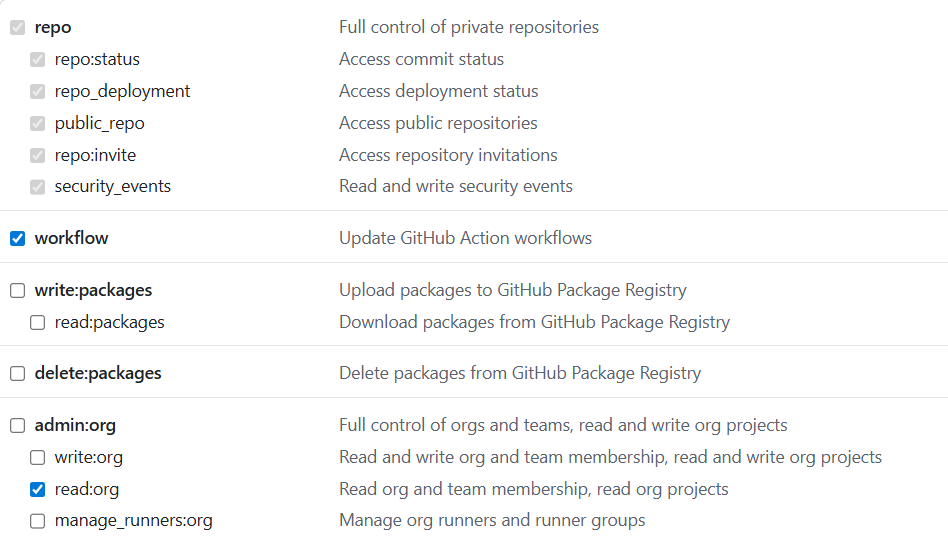
GitHub Token Token 创建入口(登录 GitHub 后打开):
Classic:https://github.com/settings/tokens/new
勾选下面的权限:
安装 GitHub CLI 1 winget install GitHub.cli
如果安装不成功
执行下面的命令
1
2
3
winget source reset --force winget source update winget install GitHub.cli --accept-source-agreements --accept-package-agreements
安装完要重启终端
配置 Gitee 私人令牌 在 Gitee 私人令牌 创建令牌,勾选 projects 读权限。
私人令牌 - Gitee.com
写入发布仓 Secret(须带 --body,不要用不带 --body 的交互命令,否则 Windows 下容易写入空值):
1 gh secret set GITEE_TOKEN -R psvmc/z-git-releases --body "你的Gitee令牌"
验证:触发 workflow 后,日志中 GITEE_TOKEN: 应显示 ***,而不是空白。
注意每个发布仓都要单独配置一次 Secret。
项目内脚本 源码仓库 scripts/ 目录下保留以下文件:
1
2
3
4
5
6
7
8
9
10
11
scripts/ ├── build-release.bat # 本地生产构建(exe + NSIS 安装包) ├── build-release.sh # Linux/macOS 本地构建入口 ├── publish-release.bat # 发版入口 ├── publish-release.ps1 # PowerShell 包装(可选) ├── set-version.bat # 一键修改项目版本号(入口) ├── set-version.ps1 # 版本脚本实现 └── release/ ├── ensure-release-gha.bat # 同步 workflow 到发布仓 ├── ensure-release-gha.ps1 # 通过 GitHub Contents API 上传 workflow └── github-workflow-release-all.yml # 三平台构建 workflow 模板
build-release.bat 执行 wails3 task package,需本机安装 NSIS (makensis 在 PATH 中)。产物:bin\ZGit.exe、bin\ZGit-amd64-installer.exe。NSIS 默认 user 作用域 ,安装路径 %LOCALAPPDATA%\Programs\z-git,与 CI 一致。
publish-release.bat 会 call scripts\release\ensure-release-gha.bat,上述 release/ 目录必须完整,否则报「系统找不到指定的路径」。
发版流程 流程 1 2 3 git tag 1 .2 .0 git push origin 1 .2 .0 scripts\publish-release.bat
或指定版本:
1 scripts\publish-release.bat 1 .2 .0
注意 :Gitee tag 与 version.go 保持一致,不加 v 前缀 (如 1.2.0,不是 v1.2.0)。
发版前务必先 git push origin <tag>,否则 Actions 克隆不到对应 tag。
改版本号可执行 scripts\set-version.bat(交互式,提示当前 patch +1 并支持回车默认)或 scripts\set-version.bat 1.2.0(直接指定)。会同步 version.go、build/config.yml,并调用 wails3 task common:update:build-assets 更新 NSIS / deb / macOS 等打包配置。查看当前版本:scripts\set-version.bat --show。
脚本会:
从 version.go 读取版本号(未传参时)
将 github-workflow-release-all.yml 同步到 psvmc/z-git-releases 的 .github/workflows/release-all.yml
触发 release-all.yml workflow
约 10~30 分钟后在 Release 页查看:
Release 更新说明 发布 job 会从 Gitee 拉取完整 tag 历史,按版本号排序找到上一个 tag ,再用 git log 生成变更列表,写入 Release 正文。格式示例:
1 2 3 4 ## 变更 (1.2.0 → 1.2.1) - 修复更新检查逻辑 (a1b2c3d)- 优化启动速度 (e4f5g6h)
规则:
数据来源是 Gitee 上的 commit ,排除 merge commit(--no-merges)
自动兼容 1.2.0 / v1.2.0 两种 tag 写法
若是首个 tag(没有上一个),显示「首个发布版本」
应用内检查更新时,Wails Updater 读取的就是这份 Release 正文
changelog 步骤用 --filter=blob:none --no-checkout 只拉 commit/tag 元数据(更快);Gitee 需 protocol.version=2,失败时自动回退全量 clone
想让更新说明可读,发版前把 commit message 写清楚即可,不必单独维护 CHANGELOG.md。
产物
文件
平台
ZGit-amd64-installer.exeWindows(NSIS 安装包)
*.deb / *.rpmLinux
ZGit-macos-universal.zipmacOS
Windows 在 Actions 中通过 wails3 task windows:package 打 NSIS 包,产物名为 ZGit-amd64-installer.exe,不再单独上传裸 ZGit.exe。本地 wails3 task package 与 CI 共用 build/windows/Taskfile.yml + project.nsi,配置一致。
安装包为 user 作用域 (RequestExecutionLevel user,无需管理员);默认安装到 %LOCALAPPDATA%\Programs\z-git;应用内更新下载该安装包后弹出 NSIS 安装向导 (非 /S 静默),并记住上次安装目录;完成页默认勾选「立即运行 ZGit」(LangString 多语言 + /INPUTCHARSET UTF8 编译,避免中文乱码)。
Linux 在 Actions 中只打 deb/rpm,不包含 AppImage(zgit-x86_64.AppImage)和 Arch 包(ZGit.pkg.tar.zst)。本地如需全量格式可执行 wails3 task linux:package。
脚本代码 版本号同步 路径:scripts/set-version.bat(调用同目录 set-version.ps1)
1 2 3 4 5 6 7 8 9 10 11 @echo off setlocal cd /d "%~dp0.."if /I "%~1 "=="--show" ( powershell -NoProfile -ExecutionPolicy Bypass -File "%~dp0set-version.ps1" -Show exit /b %ERRORLEVEL% ) powershell -NoProfile -ExecutionPolicy Bypass -File "%~dp0set-version.ps1" %* exit /b %ERRORLEVEL%
用法:
1 2 3 scripts\set -version.bat REM 交互:提示 New version (e.g. 1 .4 .2 ),回车采用建议版本 scripts\set -version.bat 1 .5 .0 REM 直接指定版本 scripts\set -version.bat --show REM 仅显示当前版本
路径:scripts/set-version.ps1
核心逻辑:读取 version.go 当前版本;未传参时按 patch 末位 +1 生成建议版本,回车即写入;然后更新 version.go、build/config.yml,并执行 wails3 task common:update:build-assets 同步各平台打包资源。
1 2 3 4 5 6 7 8 9 10 11 12 13 14 15 16 17 18 19 20 21 function Get-NextPatchVersion ([string]$value ) $normalized = Normalize-Version $value $parts = $normalized .Split('.' ) $parts [2 ] = ([int ]$parts [2 ] + 1 ).ToString() return ($parts -join '.' ) } $current = Get-ProjectVersion Write-Host "Current: $current " if (-not $Version ) { $suggestedVersion = Get-NextPatchVersion $current $inputVersion = Read-Host "New version (e.g. $suggestedVersion )" if ([string ]::IsNullOrWhiteSpace($inputVersion )) { $Version = $suggestedVersion } else { $Version = $inputVersion } }
同步后涉及的文件包括:
version.go、build/config.ymlbuild/windows/nsis/wails_tools.nsh、build/windows/info.jsonbuild/linux/nfpm/nfpm.yamlbuild/darwin/Info.plist / Info.dev.plistbuild/windows/msix/*.xml(若存在)
发版入口 路径:scripts/publish-release.bat
读版本号、同步 workflow、触发 GitHub Actions。
1 2 3 4 5 6 7 8 9 10 11 12 13 14 15 16 17 18 19 20 21 22 23 24 25 26 27 28 29 30 31 32 33 34 35 36 37 38 39 40 41 42 43 44 45 46 47 48 49 50 51 52 53 54 55 56 57 58 59 60 @echo off setlocal EnableDelayedExpansioncd /d "%~dp0.."set "GITHUB_REPO=psvmc/z-git-releases"set "GITEE_REPO=https://gitee.com/psvmc/z-git-tools-wails.git"set "TAG=":parse_args if "%~1 "=="" goto args_doneif not defined TAG set "TAG=%~1 "shift goto parse_args:args_done if not defined TAG ( for /f "tokens=2 delims==" %%a in ('findstr /C:"const Version" version.go') do set "VER =%%a " set "VER =!VER:"=! " for /f "tokens=* delims= " %%a in ("!VER! ") do set "VER =%%a " set "TAG=!VER! " ) where gh >nul 2 >&1 || ( echo [error] Install GitHub CLI and run: gh auth login exit /b 1 ) echo .echo === ZGit release (GitHub Actions: Windows + Linux + macOS) ===echo Tag: %TAG% echo GitHub repo: %GITHUB_REPO% echo Gitee repo: %GITEE_REPO% echo .echo Prerequisites:echo 1 . Gitee token in GitHub secret GITEE_TOKENecho gh secret set GITEE_TOKEN -R %GITHUB_REPO% --body "YOUR_GITEE_TOKEN"echo 2 . Push tag to Gitee: git push origin %TAG% echo .set "GITHUB_REPO=%GITHUB_REPO% "call "%~dp0release\ensure-release-gha.bat"if errorlevel 1 exit /b 1 echo Triggering release-all workflow...gh workflow run release-all.yml -R "%GITHUB_REPO% " -f "tag=%TAG% " -f "gitee_repo=%GITEE_REPO% " if errorlevel 1 ( echo [error] Failed to start workflow exit /b 1 ) echo .echo Build started. Wait 10 -30 min, then check:echo https://github.com/%GITHUB_REPO% /releases/tag/%TAG% echo https://github.com/%GITHUB_REPO% /actionsecho .echo Watch: gh run watch -R %GITHUB_REPO% exit /b 0
同步 workflow 路径:scripts/release/ensure-release-gha.bat
调用 PowerShell,将 workflow 上传到发布仓。
1 2 3 4 5 6 7 8 9 10 11 12 13 @echo off setlocal cd /d "%~dp0..\.."if not defined GITHUB_REPO set "GITHUB_REPO=psvmc/z-git-releases"where gh >nul 2 >&1 || ( echo [error] gh not found. Run: gh auth login exit /b 1 ) powershell -NoProfile -ExecutionPolicy Bypass -File "%~dp0ensure-release-gha.ps1" -Repo "%GITHUB_REPO% " exit /b %errorlevel%
上传 workflow 路径:scripts/release/ensure-release-gha.ps1
通过 GitHub Contents API 创建或更新 .github/workflows/release-all.yml。
1 2 3 4 5 6 7 8 9 10 11 12 13 14 15 16 17 18 19 20 21 22 23 24 25 26 27 28 29 30 31 32 33 34 35 36 37 38 39 40 41 42 43 44 45 46 47 48 param ( [string ]$Repo = $env:GITHUB_REPO ) $ErrorActionPreference = 'Stop' if (-not $Repo ) { $Repo = 'psvmc/z-git-releases' }$workflowName = 'release-all.yml' $workflowPath = ".github/workflows/$workflowName " $sourceFile = Join-Path $PSScriptRoot 'github-workflow-release-all.yml' if (-not (Test-Path $sourceFile )) { Write-Error "Missing $sourceFile " } $content = [IO.File ]::ReadAllText($sourceFile )$b64 = [Convert ]::ToBase64String([Text.Encoding ]::UTF8.GetBytes($content ))$apiArgs = @ ( "repos/$Repo /contents/$workflowPath " , '-X' , 'PUT' , '-f' , "message=Add or update release-all workflow" , '-f' , "content=$b64 " , '-f' , 'branch=main' ) $prevEap = $ErrorActionPreference $ErrorActionPreference = 'SilentlyContinue' $existingJson = gh api "repos/$Repo /contents/$workflowPath " 2 >$null $checkCode = $LASTEXITCODE $ErrorActionPreference = $prevEap if ($checkCode -eq 0 -and $existingJson ) { $existing = $existingJson | ConvertFrom-Json if ($existing .sha) { $apiArgs += '-f' , "sha=$ ($existing .sha)" Write-Host "Updating workflow on $Repo ..." } } else { Write-Host "Creating workflow on $Repo ..." } gh api @apiArgs if ($LASTEXITCODE -ne 0 ) { exit $LASTEXITCODE }Write-Host "Workflow ready: https://github.com/$Repo /blob/main/$workflowPath "
三平台构建 workflow 路径:scripts/release/github-workflow-release-all.yml(同步到发布仓后为 .github/workflows/release-all.yml)
matrix 并行构建 Win / Linux / macOS,汇总 artifact 后发布 Release;publish job 会从 Gitee 生成 commit 变更列表作为 Release 正文。
1 2 3 4 5 6 7 8 9 10 11 12 13 14 15 16 17 18 19 20 21 22 23 24 25 26 27 28 29 30 31 32 33 34 35 36 37 38 39 40 41 42 43 44 45 46 47 48 49 50 51 52 53 54 55 56 57 58 59 60 61 62 63 64 65 66 67 68 69 70 71 72 73 74 75 76 77 78 79 80 81 82 83 84 85 86 87 88 89 90 91 92 93 94 95 96 97 98 99 100 101 102 103 104 105 106 107 108 109 110 111 112 113 114 115 116 117 118 119 120 121 122 123 124 125 126 127 128 129 130 131 132 133 134 135 136 137 138 139 140 141 142 143 144 145 146 147 148 149 150 151 152 153 154 155 156 157 158 159 160 161 162 163 164 165 166 167 168 169 170 171 172 173 174 175 176 177 178 179 180 181 182 183 184 185 186 187 188 189 190 191 192 193 194 195 196 197 198 199 200 201 202 203 204 205 206 207 208 209 210 211 212 213 214 215 216 217 218 219 220 221 222 223 224 225 226 227 228 229 230 231 232 233 234 235 236 237 238 239 240 241 242 243 244 245 246 247 248 249 250 251 252 253 254 255 256 257 258 259 260 261 262 263 264 265 266 267 268 269 270 271 272 273 274 275 276 277 278 279 280 281 282 283 284 285 286 287 288 289 290 291 292 293 294 295 296 297 298 299 300 name: Release All Platforms on: workflow_dispatch: inputs: tag: description: Release tag (e.g. 1.2 .1 ) required: true gitee_repo: description: Gitee source URL (no credentials) required: false default: https://gitee.com/psvmc/z-git-tools-wails.git permissions: contents: write jobs: build: strategy: fail-fast: false matrix: include: - os: windows-latest platform: windows - os: ubuntu-24.04 platform: linux - os: macos-latest platform: macos runs-on: ${{ matrix.os }} steps: - name: Clone from Gitee env: GITEE_TOKEN: ${{ secrets.GITEE_TOKEN }} GITEE_REPO: ${{ inputs.gitee_repo }} RELEASE_TAG: ${{ inputs.tag }} shell: bash run: | set -euo pipefail GITEE_TOKEN="$(printf '%s' "${GITEE_TOKEN}" | tr -d '\r\n' | sed -e 's/^[[:space:]]*//' -e 's/[[:space:]]*$//')" if [ -z "${GITEE_TOKEN}" ]; then echo "::error::GITEE_TOKEN is empty. Run: gh secret set GITEE_TOKEN -R <repo> --body \"YOUR_GITEE_TOKEN\"" exit 1 fi REPO_PATH="${GITEE_REPO#https://}" REPO_PATH="${REPO_PATH#http://}" CLONE_URL="https://${REPO_PATH}" export GITEE_TOKEN git config --global http.postBuffer 524288000 git config --global http.version HTTP/1.1 TAG_CANDIDATES=("$RELEASE_TAG") if [[ "$RELEASE_TAG" == v* ]]; then TAG_CANDIDATES+=("${RELEASE_TAG#v}") else TAG_CANDIDATES+=("v${RELEASE_TAG}") fi clone_ok=false last_err="" for TAG in "${TAG_CANDIDATES[@]}" ; do for attempt in 1 2 3 ; do echo "Cloning tag ${TAG} (attempt ${attempt})..." rm -rf repo set +e err=$( GIT_TERMINAL_PROMPT=0 git -c credential.helper= \ -c "credential.helper=!f() { echo username=oauth2; echo password=${GITEE_TOKEN}; }; f" \ clone --depth 1 --branch "$TAG" "$CLONE_URL" repo 2 >&1 ) code=$? set -e if [ "$code" -eq 0 ]; then echo "Cloned tag ${TAG}" clone_ok=true break 2 fi last_err="$err" echo "$err" sleep $((attempt * 5 )) done done if [ "$clone_ok" != true ]; then echo "::error::Failed to clone tag ${RELEASE_TAG} from Gitee." echo "::error::Check: 1) git push origin ${RELEASE_TAG#v} 2) GITEE_TOKEN valid (projects scope) 3) gh secret set GITEE_TOKEN --body" if [ -n "$last_err" ]; then echo "::error::Git said: ${last_err}" fi exit 1 fi - uses: actions/setup-go@v5 with: go-version: "1.25.x" cache-dependency-path: repo/go.sum - uses: actions/setup-node@v4 with: node-version: "20" cache: npm cache-dependency-path: repo/frontend/package-lock.json - name: Install NSIS (Windows) if: matrix.platform == 'windows' shell: pwsh run: | choco install nsis -y --no-progress $nsisDir = Join-Path ${env:ProgramFiles(x86)} 'NSIS' if (-not (Test-Path (Join-Path $nsisDir 'makensis.exe'))) { $nsisDir = Join-Path $env:ProgramFiles 'NSIS' } if (-not (Test-Path (Join-Path $nsisDir 'makensis.exe'))) { Write-Error "makensis.exe not found after NSIS install" exit 1 } Add-Content -Path $env:GITHUB_PATH -Value $nsisDir & (Join-Path $nsisDir 'makensis.exe') /VERSION - name: Install Linux deps if: matrix.platform == 'linux' run: | sudo apt-get update sudo apt-get install -y libgtk-4-dev libwebkitgtk-6.0-dev pkg-config build-essential - name: Build working-directory: repo shell: bash run: | set -euo pipefail export PATH="$(go env GOPATH)/bin:$PATH" go install github.com/wailsapp/wails/v3/cmd/wails3@latest cd frontend && npm ci && cd .. mkdir -p release if [ "${{ matrix.platform }} " = "windows" ]; then if ! command -v makensis >/dev/null 2 >&1; then echo "::error::makensis not found in PATH after NSIS install" exit 1 fi wails3 task windows:package cp -f bin/*-installer.exe release/ elif [ "${{ matrix.platform }} " = "linux" ]; then if wails3 task linux:create:deb && wails3 task linux:create:rpm; then cp -f bin/*.deb bin/*.rpm release/ 2 >/dev/null || true else wails3 task linux:build cp -f bin/ZGit release/ZGit-linux-amd64 fi else wails3 task darwin:package:universal ditto -c -k --keepParent bin/ZGit.app release/ZGit-macos-universal.zip fi ls -la release/ - name: Upload artifact uses: actions/upload-artifact@v4 with: name: ${{ matrix.platform }} path: repo/release/* publish: needs: build runs-on: ubuntu-latest steps: - name: Generate changelog from git tags env: GITEE_TOKEN: ${{ secrets.GITEE_TOKEN }} GITEE_REPO: ${{ inputs.gitee_repo }} RELEASE_TAG: ${{ inputs.tag }} shell: bash run: | set -euo pipefail GITEE_TOKEN="$(printf '%s' "${GITEE_TOKEN}" | tr -d '\r\n' | sed -e 's/^[[:space:]]*//' -e 's/[[:space:]]*$//')" if [ -z "${GITEE_TOKEN}" ]; then echo "::error::GITEE_TOKEN is empty." exit 1 fi REPO_PATH="${GITEE_REPO#https://}" REPO_PATH="${REPO_PATH#http://}" CLONE_URL="https://${REPO_PATH}" git config --global http.postBuffer 524288000 git config --global http.version HTTP/1.1 clone_for_changelog() { GIT_TERMINAL_PROMPT=0 git -c credential.helper= \ -c "credential.helper=!f() { echo username=oauth2; echo password=${GITEE_TOKEN}; }; f" \ "$@" } clone_ok=false last_err="" for attempt in 1 2 3 ; do echo "Cloning for changelog (attempt ${attempt})..." rm -rf repo set +e err=$( clone_for_changelog -c protocol.version=2 \ clone --filter=blob:none --tags --no-checkout "$CLONE_URL" repo 2 >&1 ) code=$? set -e if [ "$code" -eq 0 ]; then echo "Cloned for changelog (partial)" clone_ok=true break fi last_err="$err" echo "$err" sleep $((attempt * 5 )) done if [ "$clone_ok" != true ]; then echo "Partial clone failed, trying full clone..." rm -rf repo set +e err=$( clone_for_changelog clone --tags --no-checkout "$CLONE_URL" repo 2 >&1 ) code=$? set -e if [ "$code" -eq 0 ]; then echo "Cloned for changelog (full)" clone_ok=true else last_err="$err" fi fi if [ "$clone_ok" != true ]; then echo "::error::Failed to clone for changelog." if [ -n "$last_err" ]; then echo "::error::Git said: ${last_err}" fi exit 1 fi cd repo resolve_tag() { local tag="$1" for candidate in "$tag" "${tag#v}" "v${tag#v}" ; do if git rev-parse "refs/tags/${candidate}" >/dev/null 2 >&1; then echo "$candidate" return 0 fi done return 1 } CURRENT_TAG="$(resolve_tag "$RELEASE_TAG" )" || { echo "::error::Tag ${RELEASE_TAG} not found on Gitee." exit 1 } PREV_TAG="$(git tag -l --sort=-version:refname | awk -v cur="$CURRENT_TAG" '$0==cur {getline; print; exit}' )" if [ -z "$PREV_TAG" ]; then RANGE="$CURRENT_TAG" HEADER="## 变更 (${CURRENT_TAG})" LOG="- 首个发布版本" else RANGE="${PREV_TAG}..${CURRENT_TAG}" HEADER="## 变更 (${PREV_TAG} → ${CURRENT_TAG})" LOG=$(git log "$RANGE" --pretty=format:"- %s (%h)" --no-merges) if [ -z "$LOG" ]; then LOG="- 无 commit 变更(可能仅有 tag 移动)" fi fi { printf '%s\n\n' "$HEADER" printf '%s\n' "$LOG" } > "$GITHUB_WORKSPACE/release-notes.md" echo "Changelog for ${RANGE}:" cat "$GITHUB_WORKSPACE/release-notes.md" - name: Verify release notes run: test -s release-notes.md - name: Download artifacts uses: actions/download-artifact@v4 with: path: dist merge-multiple: true - name: List release files run: find dist -type f -ls - name: Publish to GitHub Release uses: softprops/action-gh-release@v2 with: tag_name: ${{ inputs.tag }} target_commitish: main name: ZGit ${{ inputs.tag }} body_path: release-notes.md files: dist/** env: GITHUB_TOKEN: ${{ secrets.GITHUB_TOKEN }}
小结 这套方案的核心思路:
源码与发布分离 — Gitee 管代码,GitHub 管安装包构建全部上云 — 三平台 matrix,本机零构建环境依赖workflow 随源码版本管理 — 发版时 ensure-release-gha 同步到发布仓,改 workflow 不用去 GitHub 网页手改更新说明自动生成 — 从 Gitee commit 历史生成 Release 正文,应用内更新与用户下载页共用同一份说明
本地开发构建使用 scripts\build-release.bat,一次产出 bin\ZGit.exe 与 bin\ZGit-amd64-installer.exe(需安装 NSIS)。与 CI 发版共用同一套 NSIS 配置,产物一致;CI 通过 wails3 task windows:package 构建。
发版检查清单
scripts\set-version.bat(交互 patch +1 / 回车默认)或 scripts\set-version.bat <版本>,确认 version.go 与 build/config.yml 等版本号一致代码已 push 到 Gitee,git tag 且 git push origin <tag>
发布仓 Secret GITEE_TOKEN 有效(日志中为 ***)
执行 scripts\publish-release.bat,用 gh run watch -R psvmc/z-git-releases 查看进度
Windows 安装包确认:INSTALL_SCOPE=user、默认路径 %LOCALAPPDATA%\Programs\z-git(见 build/windows/nsis/project.nsi)
NSIS 安装包配置 Windows 安装包使用 NSIS,配置集中在源码仓以下文件:
文件
作用
build/windows/Taskfile.ymlINSTALL_SCOPE 默认 user;makensis 传 /INPUTCHARSET UTF8 及 user 作用域参数
build/windows/nsis/project.nsi安装路径、完成页「立即运行」(LangString 多语言)、注册表 InstallLocation 读写
build/windows/nsis/wails_tools.nshWails 自动生成的产品信息、卸载项等(set-version.bat 会同步版本号)
本地与 GitHub Actions 完全一致 :本地 wails3 task package 路由到 windows:package,CI 直接执行 wails3 task windows:package,最终都走 create:nsis:installer。
推荐配置
项目
值
说明
安装作用域
usermachine 会要求管理员权限,应用内更新易失败
执行级别
user不触发 UAC
默认安装路径
%LOCALAPPDATA%\Programs\z-gitNSIS:$LOCALAPPDATA\Programs\z-git
注册表
HKCUuser 作用域卸载信息与 InstallLocation
更新方式
可见 NSIS 向导
应用内更新不带 /S,用户确认后覆盖安装
完成页
「立即运行 ZGit」
默认勾选;LangString ZGIT_FINISH_RUN + SimpChinese/English
脚本编码
/INPUTCHARSET UTF8makensis 统一按 UTF-8 编译,避免中文乱码
Taskfile 关键片段 build/windows/Taskfile.yml:
1
2
3
4
5
6
7
8
package: vars: INSTALL_SCOPE: '{{.INSTALL_SCOPE | default "user"}}' create:nsis:installer: cmds: - makensis /INPUTCHARSET UTF8 -DWAILS_INSTALL_SCOPE=user -DREQUEST_EXECUTION_LEVEL=user \ -DARG_WAILS_AMD64_BINARY=".../bin/ZGit.exe" project.nsi
project.nsi 关键片段 1 2 3 4 5 6 7 8 9 10 11 12 13 14 15 16 17 18 !if ndef WAILS_INSTALL_SCOPE!define WAILS_INSTALL_SCOPE "user" !endif !define MUI_FINISHPAGE_RUN "$INSTDIR \${PRODUCT_EXECUTABLE} " !define MUI_FINISHPAGE_RUN_TEXT "$(ZGIT_FINISH_RUN) " !define MUI_FINISHPAGE_RUN_CHECKED!insertmacro MUI_LANGUAGE "SimpChinese" !insertmacro MUI_LANGUAGE "English" LangString ZGIT_FINISH_RUN ${LANG_SIMPCHINESE} "立即运行 ${INFO_PRODUCTNAME} " LangString ZGIT_FINISH_RUN ${LANG_ENGLISH} "Launch ${INFO_PRODUCTNAME} " !if "${WAILS_INSTALL_SCOPE} " == "user" InstallDir "$LOCALAPPDATA \Programs\z-git" InstallDirRegKey HKCU "${UNINST_KEY} " "InstallLocation" !endif
project.nsi 中 WAILS_INSTALL_SCOPE 须用 !ifndef 包裹,否则与 Taskfile 传入的 -D 参数重复定义,makensis 会报错 abort。
完成页中文勿写死在 !define MUI_FINISHPAGE_RUN_TEXT "立即运行 ..." 里——在 English 语言包下会被按系统代码页误解析,运行时显示乱码。应改用 LangString,并配合 /INPUTCHARSET UTF8 编译。
若曾发布过 machine 作用域安装包(装到 Program Files),用户升级到新 user 包后会装到 %LOCALAPPDATA%\Programs\z-git;建议在 Release 说明中提示卸载旧版。