NPM发布自己的依赖
前置准备
检查包名是否可用
1 | npm search z-yapi-mcp |
或者访问 https://www.npmjs.com/package/z-yapi-mcp 查看是否已被占用。
如果已被占用,需要修改 package.json 中的 name 字段。
这个名称不用在www.npmjs.com上提前创建,会在发布的时候自动创建。
注册 NPM 账号
如果你还没有 NPM 账号,请先注册:
1 | npm adduser |
或者登录已有账号:
切换到原镜像
1 | npm config set registry https://registry.npmjs.org/ |
设置镜像
1 | npm config set registry https://registry.npmmirror.com/ |
发布步骤
更新版本号
每次发布都需要更新版本号,遵循 SemVer 规范:
1 | # 更新 patch 版本 (1.0.0 -> 1.0.1) |
或者直接修改 package.json 中的 version 字段。
构建项目
1 | npm run build |
确保 dist/ 目录已生成且包含所有必要文件。
配置发布文件
确保 package.json 中包含以下关键字段:
1 | { |
创建 .npmignore(可选)
如果使用files 字段,就不用使用这个文件。
如果不想使用 files 字段,可以创建 .npmignore 文件:
1 | # 源码 |
测试打包内容
在正式发布前,可以先测试哪些文件会被打包:
1 | npm pack --dry-run |
这会列出将要发布的所有文件,确认无误后再发布。
发布到 NPM
使用2FA
账号要开启2FA
注意
使用2FA,会给4个恢复码,千万不要丢了,换电脑必须使用恢复码登录,如果经常更换电脑不建议使用2FA。并且国内我没找到那个支持2FA认证的APP的。微软的试了不行。
打开终端或浏览器,访问
登录
1 | npm config set registry https://registry.npmjs.org/ |
发布
1 | npm publish |
使用Access Tokens
我这里2FA添加设备一直失败,就是用Access Tokens了
1 | npm config set //registry.npmjs.org/:_authToken=你的token --location=project |
Token创建的时候填入下面的几项
设置
Token name勾选
Bypass two-factor authentication (2FA)Packages and scopes中 权限选择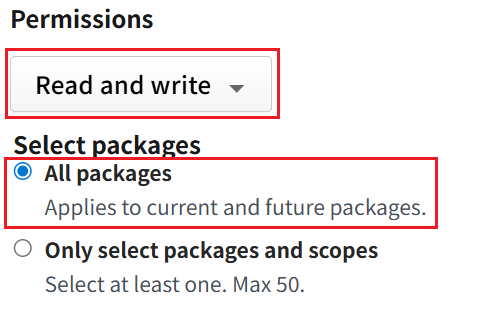
发布后的使用
发布后
MCP 客户端可以直接使用包名
1 | { |
查看版本
1 | npx -y z-yapi-mcp --version |
命令行测试
1 | npx -y z-yapi-mcp --stdio --yapi-base-url=https://api.psvmc.cn/ --yapi-token=yourtoken --yapi-project-id=70 |
发布前
发布前这样运行
1 | { |
命令行测试
1 | npx . --stdio --yapi-base-url=https://api.psvmc.cn/ --yapi-token=yourtoken --yapi-project-id=70 |
版本更新流程
修改代码并提交
1 | git add . |
更新版本号
1 | # 更新 patch 版本 (1.0.0 -> 1.0.1) |
这会:
- 更新
package.json中的版本号 - 创建一个新的 git tag
推送到远程仓库
1 | git push |
发布新版本
1 | npm run build |
一键更新发布脚本
认证后运行下面的脚本
npm_publish.bat
1 | @echo off |
查看发布的包
1 | npm info z-mcp-mysql |
常见问题
发布无权限
Q: 发布时提示 “You do not have permission…”
A: 包名可能已被他人使用,需要更换一个唯一的包名。
撤销发布
Q: 如何撤销已发布的版本?
A:
1 | npm unpublish z-yapi-mcp@1.0.0 |
注意:NPM 规定发布后 72 小时内可以撤销,超过 72 小时只能废弃(deprecate):
1 | npm deprecate z-yapi-mcp@1.0.0 "此版本已废弃,请使用最新版本" |
发布测试版本
Q: 如何发布测试版本?
A: 使用 prerelease 标签:
1 | npm version prerelease --preid=beta # 1.0.0 -> 1.0.1-beta.0 |
用户安装测试版本:
1 | npm install z-yapi-mcp@beta |
发布哪些文件
Q: 发布时包含 dist 目录吗?
A: 是的,files 字段中已包含 dist/**/*,构建后的文件会一起发布。
发布不成功
清掉官方源的旧登录并重新登录
1 | npm logout --registry https://registry.npmjs.org/ |
再验证
1 | npm whoami --registry https://registry.npmjs.org/ |
能获取用户信息后重新发布