海光GPU SCNet环境部署
前言
AI模型管理
https://www.scnet.cn/ui/console/index.html#/model-management/list
镜像管理
https://www.scnet.cn/ui/console/index.html#/container-service/my-image
模型部署页面
https://www.scnet.cn/ui/console/index.html#/model-deploy
相关网站
ModelScope
海光开发者社区
准备工作
创建目录
1 | mkdir -p /public/home/hnxhly/tools/z-ai-docker/ai-server-common |
环境测试代码
验证 PyTorch 是否识别海光 GPU
/public/home/hnxhly/tools/z-ai-docker/ai-server-common/cuda_test.py
1 | import torch |
注意:
在 ROCm 中,
torch.cuda接口仍然可用(AMD/海光做了 CUDA API 兼容层),所以代码无需修改。
代码路径为
1 | /public/home/hnxhly/tools/z-ai-docker/ai-server-common |
下载模型
环境变量
创建目录
1 | mkdir -p /public/home/hnxhly/tools/modelscope |
添加环境变量
1 | vim ~/.bashrc |
添加
1 | # ModelScope cache directory |
重新加载配置
1 | source ~/.bashrc |
验证
1 | echo $MODELSCOPE_CACHE |
下载
Qwen2.5-VL-32B-Instruct
下载模型
1 | modelscope download --model Qwen/Qwen3-8B |
模型下载位置为
1 | /data/tools/modelscope |
模型复制
平台上下载的模型位置
1 | ~/SothisAI/model/Aihub/Qwen3-8B/main/Qwen3-8B |
移动到环境变量位置
1 | mkdir -p $MODELSCOPE_CACHE/models/Qwen/Qwen3-8B |
1 | mkdir -p $MODELSCOPE_CACHE/models/Qwen/Qwen2.5-VL-32B-Instruct |
启动设置
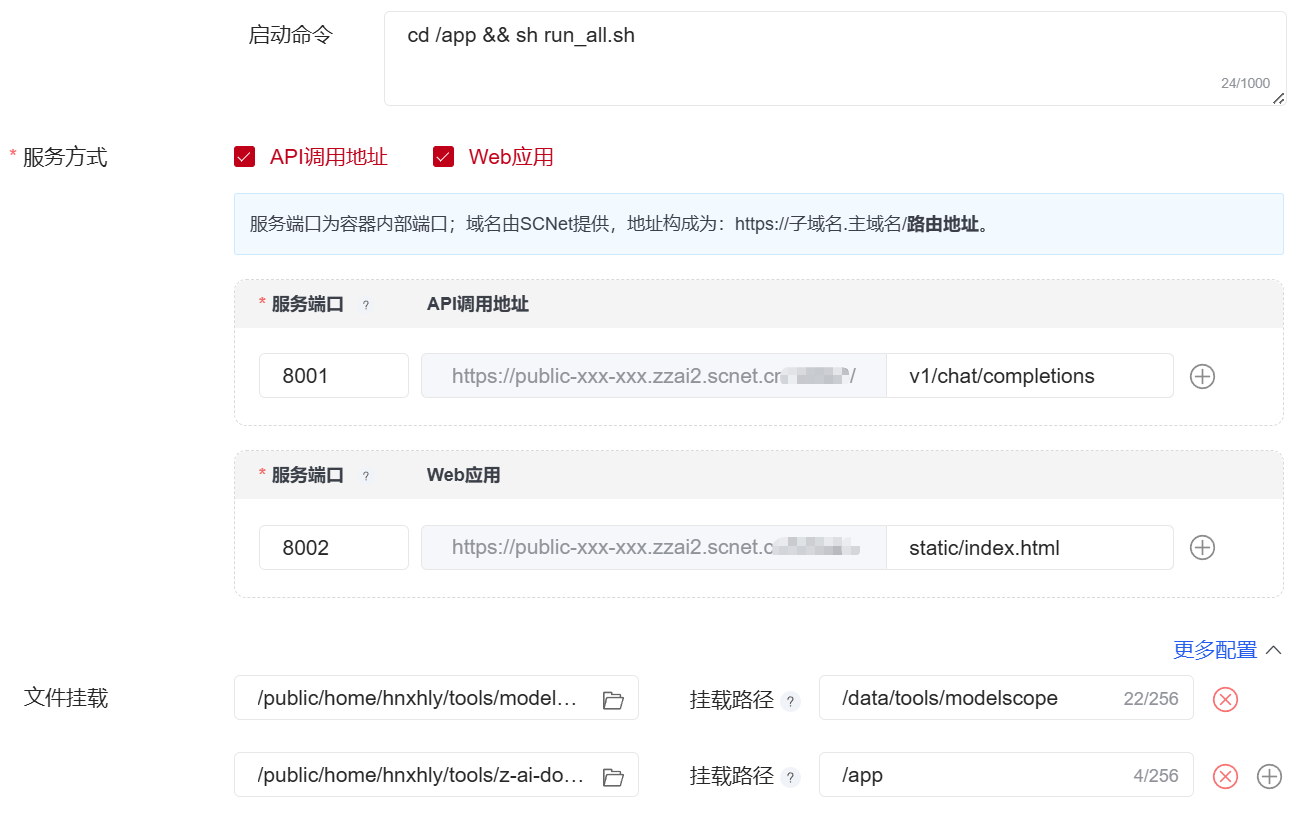
文件挂载
modelscope下载目录➡/data/tools/modelscope项目目录 ➡ /app
Docker
Dockerfile
/public/home/hnxhly/tools/z-ai-docker/ai-server-common/Dockerfile
1 | FROM image.sourcefind.cn:5000/dcu/admin/base/vllm:0.8.5-ubuntu22.04-dtk25.04.1-rc5-das1.6-py3.10-20250724 |
测试
1 | { |
CURL测试
1 | curl 'https://public-2021127773854605315-iaab.zzai2.scnet.cn:58041/v1/chat/completions' \ |