前言
模型下载
模型库首页 · 魔搭社区
安装ModelScope
环境变量
Linux
创建目录
1
2
| mkdir -p /public/home/hnxhly/tools/modelscope
chmod 755 /public/home/hnxhly/tools/modelscope
|
添加环境变量
添加
1
2
|
export MODELSCOPE_CACHE="/public/home/hnxhly/tools/modelscope"
|
重新加载配置
验证
Win
添加环境变量
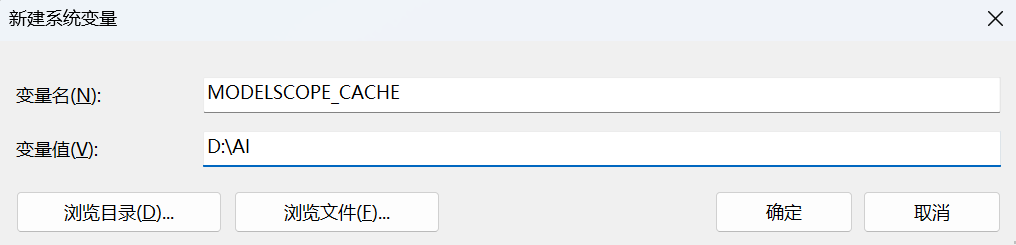
然后这样下载
1
| modelscope download --model deepseek-ai/DeepSeek-OCR-2
|
下载模型
使用环境变量
设置环境变量后
1
| modelscope download --model Qwen/Qwen3-8B
|
直接指定
指定下载目录
1
| modelscope download --model deepseek-ai/DeepSeek-OCR-2 --local_dir "D:\AI\Models\DeepSeek-OCR-2"
|
临时设置环境变量
下面这种方式会在设置的目录下自动创建models文件夹
1
2
3
4
5
6
7
|
export MODELSCOPE_CACHE=/data/ai
modelscope download --model deepseek-ai/DeepSeek-OCR-2
$env:MODELSCOPE_CACHE="D:\AI"
modelscope download --model deepseek-ai/DeepSeek-OCR-2
|
后台下载
方式1
使用 screen 启动下载任务后,即使你关闭终端(或断开 SSH 连接),下载仍然会继续运行。
1
2
3
4
|
screen -S modelscope_download
modelscope download --model Wan-AI/Wan2.2-T2V-A14B
|
按 Ctrl+A, 再按 D 键 detach 回主终端
之后查看进度
1
| screen -r modelscope_download
|
查看所有会话状态:
方式2
1
| nohup modelscope download --model deepseek-ai/DeepSeek-OCR-2 > download.log 2>&1 &
|
说明:
nohup:忽略挂断信号(SIGHUP),即使你退出终端或断开 SSH,进程也不会终止;> download.log 2>&1:将标准输出和错误输出重定向到 download.log 文件,方便后续查看进度或排查问题;&:将命令放入后台执行;- 返回的数字是进程 ID(PID),你可以用
jobs 或 ps 查看。
常用模型下载
文字
千问3-8B · 模型库
1
| modelscope download --model Qwen/Qwen3-8B
|
千问3-32B · 模型库
1
| modelscope download --model Qwen/Qwen3-32B
|
DeepSeek-V2-Chat · 模型库
1
| modelscope download --model deepseek-ai/DeepSeek-V2-Chat
|
DeepSeek-V3.2-w4a8 · 模型库
光合开发者社区
1
| modelscope download --model taoxiaoxin/DeepSeek-V3.2-w4a8
|
千问3.5-35B-A3B · 模型库
光合开发者社区
1
| modelscope download --model Qwen/Qwen3.5-35B-A3B
|
测试
1
2
3
4
5
6
7
8
9
10
11
12
13
| {
"model": "Qwen/Qwen3.5-35B-A3B",
"messages": [
{
"role": "user",
"content": "你好"
}
],
"stream": true,
"chat_template_kwargs": {
"enable_thinking": false
}
}
|
图像
1
2
3
4
5
6
7
8
9
10
11
12
13
14
15
16
17
18
19
20
21
22
| {
"model": "Qwen/Qwen3.5-35B-A3B",
"messages": [
{
"role": "user",
"content": [
{
"type": "image_url",
"image_url": {
"url": "https://qianwen-res.oss-cn-beijing.aliyuncs.com/Qwen-VL/assets/demo.jpeg"
}
},
{
"type": "text",
"text": "请详细描述这张图片的内容。"
}
]
}
],
"max_tokens": 512,
"temperature": 0.7
}
|
代码
CodeQwen1.5-7B-Chat · 模型库
1
| modelscope download --model Qwen/CodeQwen1.5-7B-Chat
|
千问3-Coder-Next · 模型库
1
| modelscope download --model Qwen/Qwen3-Coder-Next
|
图片识别
千问2.5-VL-32B-Instruct · 模型库
1
| modelscope download --model Qwen/Qwen2.5-VL-32B-Instruct
|
千问2.5-VL-32B-Instruct-AWQ量化版 · 模型库
1
| modelscope download --model Qwen/Qwen2.5-VL-32B-Instruct-AWQ
|
千问3-VL-8B-Instruct · 模型库
光合开发者社区
1
| modelscope download --model Qwen/Qwen3-VL-8B-Instruct
|
消息格式
1
2
3
4
5
6
7
8
9
10
11
12
13
14
15
16
17
18
19
20
21
22
| {
"model": "Qwen/Qwen3-VL-8B-Instruct",
"messages": [
{
"role": "user",
"content": [
{
"type": "image_url",
"image_url": {
"url": "https://qianwen-res.oss-cn-beijing.aliyuncs.com/Qwen-VL/assets/demo.jpeg"
}
},
{
"type": "text",
"text": "请详细描述这张图片的内容。"
}
]
}
],
"max_tokens": 512,
"temperature": 0.7
}
|
文生图
Ovis-Image-7B · 模型库
光合开发者社区
1
| modelscope download --model AIDC-AI/Ovis-Image-7B
|
语音
TTS
Qwen3-TTS-12Hz-1.7B-CustomVoice · 模型库
1
| modelscope download --model Qwen/Qwen3-TTS-12Hz-1.7B-CustomVoice
|
ASR
Fun-ASR-Nano-2512 · 模型库
1
| modelscope download --model FunAudioLLM/Fun-ASR-Nano-2512
|
视频
文字转视频
通义万相2.2-文生视频-A14B · 模型库
1
| modelscope download --model Wan-AI/Wan2.2-T2V-A14B
|
Embedding 模型
构建一个 RAG(检索增强生成)系统,通常会先用向量化模型从知识库中召回相关段落,再用重排序模型优化顺序,最后把最相关的段落送入大语言模型生成答案。
千问3-Embedding-0.6B-向量化模型 · 模型库
1
| modelscope download --model Qwen/Qwen3-Embedding-0.6B
|
千问3-Reranker-0.6B · 模型库
1
| modelscope download --model Qwen/Qwen3-Reranker-0.6B
|